Online match
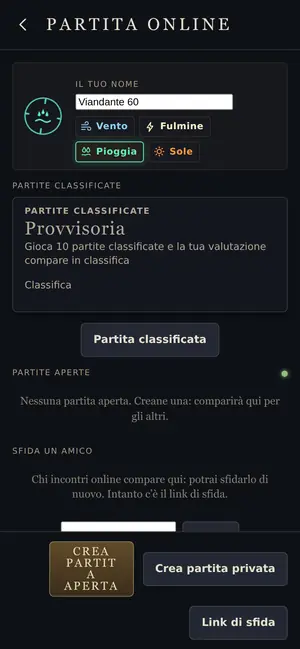
A match against another person, in real time. You create an open or private room, or send a challenge link.
How to get in
From the main menu open Online. You can:
- create an open match, which shows up in the lobby for anyone;
- create a private match, which you can only join with the five-letter code;
- join a match from the lobby or with a code;
- send a challenge link to a friend. Players you’ve already met show up in “For you” and you can challenge them again.
In the room, whoever created it chooses the sky, also with “Another sky”. When both of you tap “I’m ready”, the match starts. There’s a chat, with one message every second and a half at most.
What changes compared to the computer
- You play on equal terms: no level aids, no Omens. The World rules apply.
- The match doesn’t pause: the menu says “The match goes on”.
- At the end of the match you can ask for a rematch.
- If you turned on notifications, the game tells you when the other player joins or asks for a rematch, even with the app closed.
You stay the same player even if you close the app, and you get back into your room with the code.
Since v15
An online match can be put on hold from the pause menu, if your opponent agrees, and picked up from the same point, even days later, on this phone or computer; with an account, from another one too. If your opponent’s connection drops, the match waits two minutes for them. See also Ranked matches.
Why the two matches stay the same
The two phones don’t send each other the match, only the commands. Each one simulates the same match with the same rules, and every so often the two compare a fingerprint of the state. If one day they don’t match, the match stops and says so: it’s a game bug, not your fault.
See also
- Feats
- Beyond the clouds
- Mentioned here or mentioning this page
- Account · Ranked matches · Saves
What’s new
- v24.4 Online matches are never sent. The game no longer saves your last matches online without asking, as it did since v24.
- v22 From your Profile you can sign out of your account or delete it, along with everything the game keeps online. Without an account you can delete the online data for this phone or computer. The privacy policy is at /privacy.
- v21 Towers can’t see Cirro, and Cirro can’t die. In ranked matches and in the World of the Day he plays like a young Cirro, the same for everyone. Online, between friends, everyone brings their own.
- v17.3 The free match is now called Skirmish: choose a world and play with everything, like before. World of the Day and online matches don’t change.
- v17.2 Settings sorted into sections: Sound, Graphics, Controls and view, Minimap, Game, Profile, About. In Profile you change the name others see online, and About shows the version.
- v17.1 Against the computer: in New world choose Players: Four and how to play. Online: the lobby has Create four-player match, and the computer takes the empty seats.
- v17.1 Online, whoever leaves a four-player match is out and the others keep playing. If nothing comes from a player for 30 seconds, they’re out too.
- v17 Saved matches, replays and online rooms from older versions don’t open in this one.
- v16.1 Online match is easier to read: at the top the ranked match with its button, then open matches with “Create match”, then “Challenge a friend” with the code box, “Join” and the challenge link. On a phone you can see almost everything without scrolling.
- v16.1 Saved matches, replays and online rooms from older versions don’t open in this one.
- v16 Saved matches, replays and online rooms from older versions don’t open in this one.
- v15 Ranked matches: in Online match, “Ranked match” looks for an opponent or opens a room on a world from the verified list. At the end of the match you see how much your rating changed. After 10 matches you show up on the leaderboard.
- v15 Editor worlds can be played online against a friend too. Replays and saved matches keep them the way you made them.
- v15 An online match can be put on hold from the pause, if your opponent agrees. It picks up from the same point, even days later, on this phone or computer: you’ll find it in Online match, under matches on hold.
- v15 If your opponent’s connection drops, the match waits for them for two minutes. Then you can wait longer, put it on hold or leave. If yours drops, go back into the room and the match restarts from where it was.
- v15 Below is a short list: The Route of the Winds, Online match, World of the Day, Saved matches. “Matches on hold” only shows up when you have some. Feats, Replays and Settings are icons at the bottom.
- v13 The route is saved on your device. On the website it’s also saved online, tied to your player.
- v12 Online match: you stay the same player even if you close the app, you get back into your room with the code and you can challenge people you’ve already met. If they turned on notifications, they get an alert.
- v10 Online match: the notification arrives even if the game is open but you’re looking at something else. Tapping it takes you to the room, and when your opponent leaves it tells you their name.
- v09 The menu has Online match: you create an open or private match and play against another person. At the end of the match you can ask for a rematch.