Settings
View and controls, sound, graphics, minimap, help and language. You see the changes right away.
Where they are
In the main menu and in the match menu. You see the changes right away behind the sheet. Reset to defaults, at the bottom, puts everything back the way it was at the start. Below, every option with its values, read from the game.
Sound
- All sounds
- Default: onOff: total silence, like the menu button
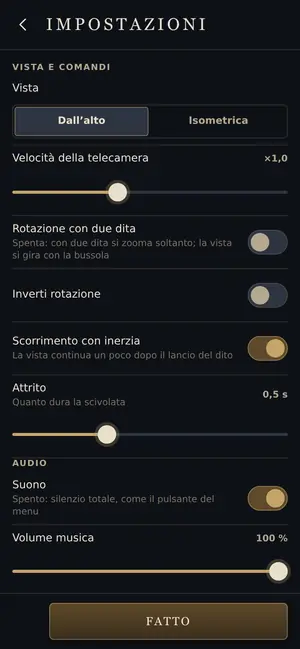
- Music
- from 0 % to 100 %Default: 100 %
- Effects
- from 0 % to 100 %Default: 100 %
Graphics
- Graphics quality
- Auto · Low · Medium · HighDefault: AutoAuto: the game lightens the graphics if it slows down. Low is the simple look, for slow phones
- Sun rays
- Default: onBeams of light between the clouds. On low quality they’re always off
- Brightness
- from 60 % to 160 %Default: 100 %
- Tower range circles
- Never · While you build · AlwaysDefault: While you build
- Performance meter
- Default: offA box at the bottom left: frames per second, time per frame and the quality in use
Controls and view
- View
- From above · IsometricDefault: From above
- View speed
- from ×0.4 to ×2.0Default: ×1.0
- Two-finger rotation (phone only)
- Default: off on the phone, on on the computerOff: two fingers only zoom; you turn the view with the compass
- Invert rotation
- Default: off
- Scrolling with momentum
- Default: onThe view keeps moving a little after you flick your finger
- Glide duration
- from 0.3 s to 1.0 sDefault: 0.5 s
- Scroll at the screen edge (computer only)
- Full screen · Always · NeverDefault: Full screen
Minimap
- Minimap
- Off · Small · LargeDefault: Small
- Corner
- Top right · Top left · Bottom rightDefault: Top rightBottom right only on computers and phones held sideways
- Opacity
- from 40 % to 100 %Default: 90 %
- Orientation
- Turn with the view · North upDefault: Turn with the view
- Bridges
- Default: on
- Springs
- Default: on
- Light zones
- Default: off
- Weather
- Default: on
- Signals
- Default: on
Game
- Messages
- All · EssentialDefault: AllEssential: only dangers and big events; the rest stays in the log
- Hints
- Default: on
- Vibration (phone only)
- Default: on
- Language
- Italiano · English · Français · Español · 简体中文 · 日本語 · РусскийDefault: ItalianoMore languages coming soon
- Learn to play
- The Tale
Profile
- Your name
- Other players see it online
About
- What’s new
See also
- Mentioned here or mentioning this page
- Minimap · On the computer · On your phone
What’s new
- v24.6.1 In Settings › Profile, «Sign in» and «Create an account» sit side by side, with «Continue with Google» above them. If you already have an account, you sign in from there.
- v24.5 Your name is at the top right of the menu. Tap it to change it, or open Settings › Profile and info and press “Change”. “Another name” suggests a new one.
- v24.5 Without an account, your name and progress stay on this device. If you create an account in Settings › Profile and info, you keep them when you change device.
- v24.4 You answer “Yes, send them” or “No, thanks”, and after a no we don't ask again. You can change your mind in Settings, under Profile: “Send my matches”. Matches are kept for 12 months, in Belgium.
- v24.1 You can turn them off in Settings, under Profile: «Send anonymous usage data». Everything else is in the privacy notice.
- v23.4 The game starts in your device’s language. You can change it in Settings, under Language, and the game remembers it.
- v22.3 The “From above” starting view is a bit lower: it looks at the islands from 63 degrees instead of 74. If you had picked it in the settings, it changes for you too.
- v22 Skirmish opens the world screen, with last time’s world already set up: choose the level and the world, then “Play this world”. “The Tale”, Bestiary, Wiki, Replays, Feats and Settings are at the bottom, in smaller tiles.
- v22 Accounts: in Settings → Profile you can create an account with email and password (you need to be at least 14; under 14, a parent creates it). You keep everything you’ve done so far: route, Cirro, saved matches, score and name.
- v20 Settings in sections: a first page with six entries (Sound, Graphics, Controls and view, Minimap, Game, Profile and info), each with a line showing what’s set. Rare options are under “More”. Back takes you to the sections.
- v20 In Settings, Graphics, under “More”: “Performance meter”, with frames per second, time per frame and the quality in use.
- v20 A match always starts from the View chosen in Settings: after the tale, the camera used to stay low.
- v17.2 Settings sorted into sections: Sound, Graphics, Controls and view, Minimap, Game, Profile, About. In Profile you change the name others see online, and About shows the version.
- v15 Below is a short list: The Route of the Winds, Online match, World of the Day, Saved matches. “Matches on hold” only shows up when you have some. Feats, Replays and Settings are icons at the bottom.
- v15 You can read the wiki inside the game: it opens from the icons on the main menu and from the match menu. The “?” next to buildings, elements, weather, Omens, Feats and Settings opens the right page. Against the computer, the match pauses while you read. The back button goes to the previous page and, from the first one, closes the wiki.
- v14 Minimap: tap to go to a spot, drag to scroll, hold down to leave a signal of your own. On phones it opens from the map button. Size, corner and layers are chosen in Settings.
- v14 Menu, pause and Settings all have the same shape. Settings has two new entries: Sun rays and Language. For now there’s only Italian.
- v12 With two fingers the game understands sooner what you want to do: zoom in or out, rotate or tilt, and it sticks with that gesture until you lift your fingers. A zoom no longer turns the view by mistake. In Settings you can turn off two-finger rotation, and the camera speed applies to rotation too.
- v11 New Settings panel, with the gear: view, brightness, music and effects volume, tower ranges, camera speed, graphics quality, vibration, hints.