On the computer
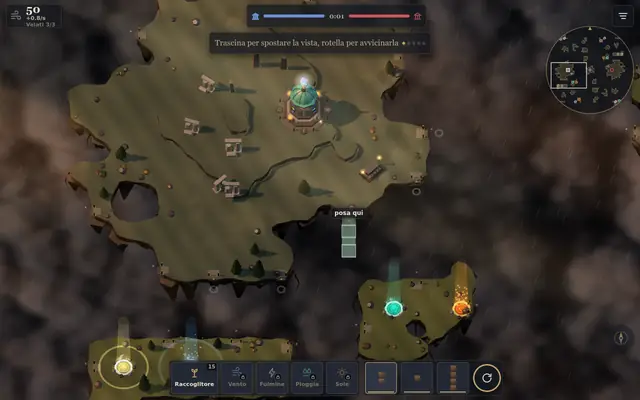
One click to choose, one click to place, keys for everything else. Mouse and keyboard together.
The mouse
- Left click chooses the spot, a second click on the piece or the building places it, like the two taps on the phone. Esc drops the choice.
- Right click on one of your bridges opens Take down; anywhere else it turns the piece or cancels the armed special.
- Right button dragged turns and tilts the view.
- Middle button dragged moves the view.
- Wheel zooms in and out.
In full screen the view also scrolls when you move the mouse to the edge. You change it in the Settings.
The keys
The same table the game shows in “How to play”.
| Key | What it does |
|---|---|
| R | rotate the piece |
| X | change piece |
| 1 · 2 | bridge · Collector |
| 3-6 | Wind, Lightning, Rain, Sun (repeat to choose) |
| Enter | lay the piece or build |
| F | cast the charged special |
| Esc | cancel, then menu |
| WASD · arrows | move the view |
| Q · E | turn the view |
| Space | back to your temple |
| U | go to the latest event |
| H | latest messages |
| Del | take down the bridge under the cursor |
| P | pause |
| middle button | drag the view |
| right button | turn and tilt the view |
See also
- Mentioned here or mentioning this page
- Settings
What’s new
- v24.3 Every command of the bar says its name: at once with the mouse over it, or by holding a finger on the phone. Cards with a Bestiary page have a small brass «i» that opens it: what it is, what it costs, what it is strong against and what beats it.
- v24.3 On the computer, moving the mouse over the map shows only the outline of the piece or the building. The first click chooses the spot and the choice stays there even if you move the mouse; a second click on the piece places it. Esc drops the choice.
- v22.1 The “New version available” notice is smaller and sits in a corner: bottom right on computers, at the top on phones.
- v22 The computer makes fewer moves: each level has a limit of actions per minute, from 5 (First Flight) to 16 (Tempest). On the first levels it leaves the central island alone for many minutes and attacks later.
- v22 On Gale and Tempest, from the tenth minute the computer tries to reach your temple before the late hours: a tower on its row or column, then a bridge for the Carrier. Fewer matches end in a stalemate or a truce.
- v22 With an account you get your progress back on another phone or computer: just “Sign in”. If you had also played there without an account, you choose which progress to keep.
- v22 From your Profile you can sign out of your account or delete it, along with everything the game keeps online. Without an account you can delete the online data for this phone or computer. The privacy policy is at /privacy.
- v22 At the bottom, “Build” opens the elements and buildings and closes as soon as you choose. Next to it stays the last building you chose: one tap and it’s in your hand again. On computers the elements are always in view.
- v21 Cirro never gets stronger. Between matches he remembers his lessons and only grows in looks: bigger after 10 matches and after 30, feather tips in the color of the element you use most, a light belly if he repairs a lot, dark wings if he hits a lot. Cirro stays saved on this phone or computer, along with your progress on the route.
- v21 The computer uses the hand on Gale and Tempest.
- v21 For now there’s no reading aloud in the tutorial and the tale: the phone or computer voice read badly, and the button is gone.
- v20 On Breeze the computer repairs and leaves your houses alone; on Tempest it goes after them.
- v18 World of the Day together: from the World of the Day page, “Together” plays today’s world as a Siege, on a Cross, with a computer ally. For now it doesn’t go on the leaderboard.
- v18 From Wind up, the computer looks for weaves, answers the visits and goes after the drifting islands.
- v17.1 Against the computer: in New world choose Players: Four and how to play. Online: the lobby has Create four-player match, and the computer takes the empty seats.
- v17 Truce: from the eighth minute you can offer to end the match in a draw, from the match menu. If the other side accepts, nobody wins. The computer only accepts if it isn’t ahead.
- v17 The computer uses nests and crews from Wind up; Breeze only places a Lantern Nest.
- v16 The computer uses miracles from Wind up; Breeze only Stone Cloud and Dawn Bridge; First Flight none. The Bare Hands Omen also bans miracles.
- v15.1 The back button works in the tutorial too: first it closes Refolo’s speech bubble, then it opens the pause.
- v15 An online match can be put on hold from the pause, if your opponent agrees. It picks up from the same point, even days later, on this phone or computer: you’ll find it in Online match, under matches on hold.
- v15 You can read the wiki inside the game: it opens from the icons on the main menu and from the match menu. The “?” next to buildings, elements, weather, Omens, Feats and Settings opens the right page. Against the computer, the match pauses while you read. The back button goes to the previous page and, from the first one, closes the wiki.
- v14 After a drag the view keeps sliding a little and stops with a tap. On computers: arrows or WASD, middle mouse button, Space to go back to the temple, U for the last event. Take down from the keyboard is now Delete.
- v14 The phone’s back button goes up one level: first it cancels what you chose, then it opens the pause. On the main menu it asks if you want to quit.
- v13 Matches save themselves every half minute, when you pause and when you leave. From the menu, “Resume match” opens it again where you left it. In the pause, “Save and quit” puts it in one of three slots. The saved match stays on this phone or computer.
- v11 The view starts from above, looking straight down at the map. On phones, two fingers rotating turn the view, and two fingers moving up or down tilt it; with a mouse, drag with the right button. The compass takes you back to the starting view or switches to the isometric one.
- v10 A tap somewhere else moves the piece, and rotating or changing it doesn’t make it disappear. With a mouse, one click is still enough.
- v09 From the menu you can install Aeolia as an app. Against the computer you can play offline too.
- v06 On Wind level the computer fights for the center right away and attacks as early as minute 1:15.